Why your store still slows down on Black Friday even after passing every load test
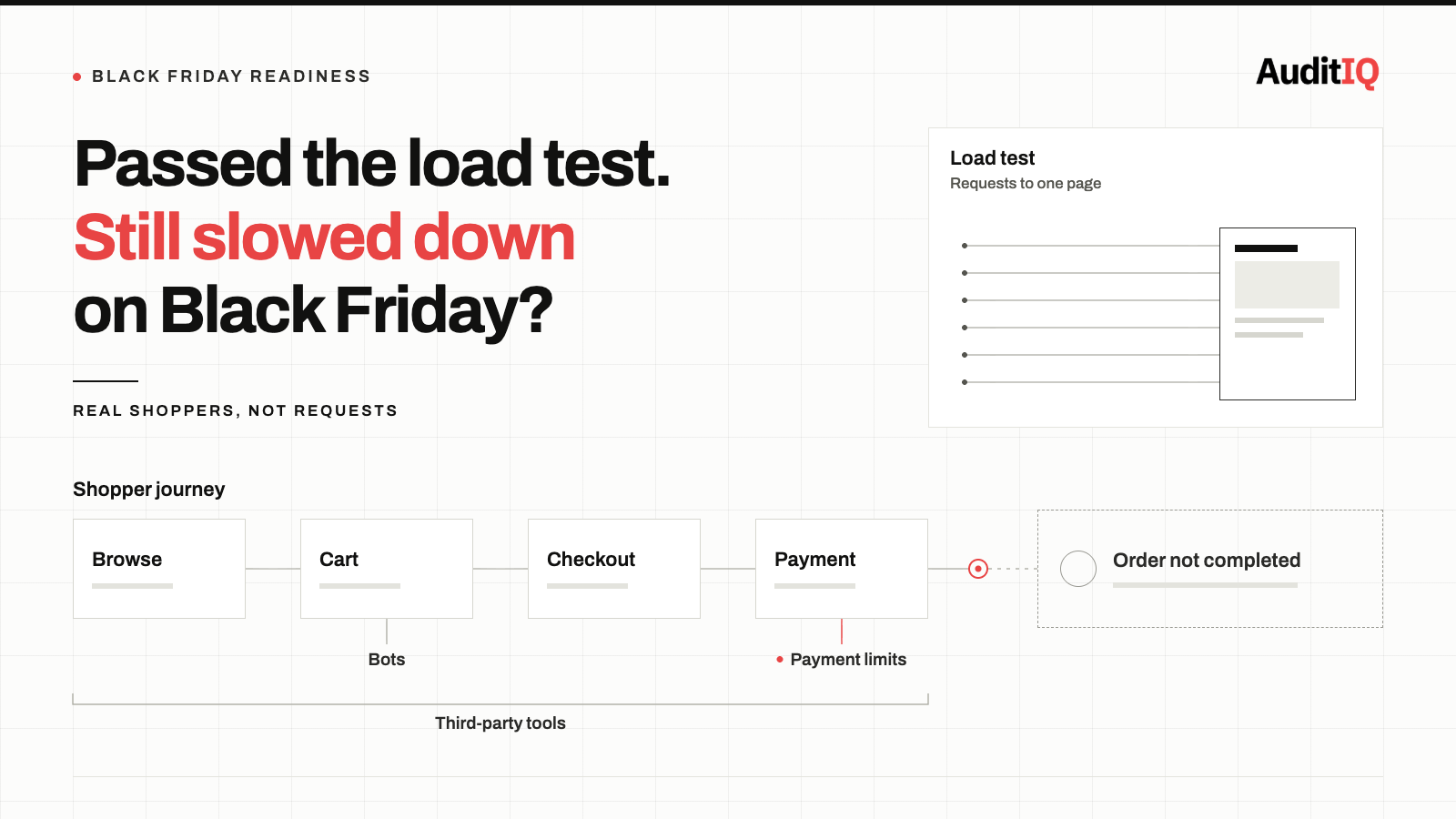
Stores that pass every load test still slow down or fail on Black Friday and Cyber Monday because tests simulate requests, not thousands of concurrent shoppers moving through cart, discount, shipping, and payment at once. The usual culprits are database contention, payment gateway limits, third-party scripts, bot traffic, and dynamic pages that bypass the CDN cache. Test full journeys with third-party scripts enabled, plan a brownout ladder in advance, and watch real-user checkout completion during the event.
Black Friday and Cyber Monday are the highest-stakes stress test your store faces all year, and in 2026 they fall on 27 and 30 November. Many teams go into the weekend confident because every load test passed. Then, within minutes of a doorbuster launch, customers see spinning checkouts, failed payments, and page timeouts, while the monitoring dashboard still shows green.
Load tests prove your pages can handle requests. BFCM proves whether your full shopping journeys, payment gateways, and third-party scripts can handle concurrent humans. Closing that gap takes better pre-event testing and real-user visibility during the event itself.
Signs your store is slowing down during BFCM
These symptoms appear during flash sales and peak weekends, and tend to vanish when traffic normalises, which makes them hard to reproduce afterwards:
- Product pages that loaded quickly in testing take several times longer during the sale, on the same URL, with the same code
- Add-to-cart buttons become unresponsive or silently fail to add the product
- Checkout pages time out or show payment errors while the rest of the site appears functional
- Inventory shows “in stock”, but orders fail because the database cannot process concurrent stock decrements fast enough
- Third-party scripts (reviews, chat, personalisation) stop loading or block page rendering
- Your uptime monitoring shows 100% availability while customers are experiencing failures
- Intermittent error messages such as “Something went wrong,” “Unable to process your request,” or “Please try again later”
Why your BFCM load tests still leave you exposed
Load testing is essential preparation, but most eCommerce load tests have structural blind spots that make them poor predictors of real peak performance:
1. Load tests hit pages, not journeys
A typical test hammers product pages and the homepage with concurrent requests. Real shoppers follow multi-step journeys: browse, search, add to cart, apply a discount code, enter shipping, and pay. The basket and checkout cannot be fully cached, so every one of those steps reaches your application and database, and load tests rarely simulate thousands of concurrent checkouts.
2. Third-party scripts are absent or mocked
Load testing tools that only request HTML never execute the third-party scripts a real browser loads on every page: reviews, chat, personalisation, analytics, and tag managers. Yottaa’s 2025 Web Performance Index, an analysis of more than 500 million visits to over 1,300 eCommerce sites, found that third-party apps account for 44% of page load time, and that each poorly optimised third-party app reduces conversions by an average of 0.29%. During a peak event, those vendors’ servers may be under load too, so when a chat widget’s CDN slows down, it can block your page rendering, a failure an HTML-only load test never simulates.
3. Payment gateways have their own capacity limits
Your site may handle 1,000 concurrent users, but your payment processor may queue or decline transactions when your request volume exceeds the rate limit for your account. Payment processing timeouts under load are one of the most common peak-event failures.
4. Database contention only appears at scale
Inventory decrements, coupon redemption counters, and order creation all require write locks on shared database rows. At low concurrency, they complete in milliseconds. At high concurrency, transactions queue behind each other, creating cascading delays that can turn a fast checkout into a timeout.
5. CDN cache misses spike on dynamic content
Your static assets cache well, but product pages with personalised pricing, stock-dependent messaging, and customer-specific recommendations, along with the basket and checkout, generate cache misses that go straight to your origin server. During a sale, the share of requests that reach your origin can rise sharply.
6. Load tests are made of shoppers, and BFCM traffic isn’t
Test traffic is cooperative. Real BFCM traffic includes scrapers, inventory-hoarding bots, and credential-stuffing attempts. Cloudflare reported that 29% of all traffic on its network on Black Friday 2024 was “Grinch bots”, and that 63% of login attempts were from bots. Imperva’s review of Black Friday 2025 found retail traffic 37% above the November average and bot attacks on retail sites up 50%, concentrated on inventory and product data endpoints, checkout, and login. That load competes with real shoppers for the same cart, session, and database resources.
Who owns the bottleneck: Shopify, Adobe Commerce, WooCommerce
Not every cause above is yours to fix, and which ones are depends on your platform:
- Shopify: Shopify reported that during BFCM 2025 its platform peaked at 489 million requests per minute at the edge and more than 117 million per minute on app servers, with sales peaking at $5.1 million per minute at 12:01 p.m. EST on Black Friday. Raw platform capacity is Shopify’s job. Yours is what you add around it: apps, theme code, third-party scripts, payment and shipping integrations, and the API limits of your inventory and fulfilment tools. Platforms still have incidents, too. On Cyber Monday 2025, Shopify acknowledged a partial outage that affected merchant admin login and in-store POS, so monitor the tools your team uses to run the sale, not only the storefront.
- Adobe Commerce and Magento: you own the stack. Database connections and locks, cache hit ratio, indexers, cron jobs and queue consumers, PHP workers, and search all have ceilings that only show up under concurrent journeys.
- WooCommerce: You also own the stack. WP-Cron and scheduled tasks, PHP workers, object caching, and database load are the first places a peak event finds limits, along with plugins that run extra queries on cart and checkout.
Likely causes of a BFCM slowdown, ordered by probability
When your site slows during a peak event, diagnose in this order:
- Database connection pool exhaustion: the application server runs out of available database connections and new requests queue. Check your connection pool settings and active connection count during load.
- Inventory write lock contention: concurrent purchases of the same product create row-level locks that serialise what should be parallel operations. This is especially severe for limited-quantity promotions.
- Payment gateway rate limiting or timeout: your payment provider throttles requests above your account’s concurrency limit, causing checkout timeouts that look like site errors.
- Third-party script cascading failure: a single slow external script can block page rendering for all visitors. Analytics, chat, personalisation, and review widgets are common culprits, and the Yottaa figures above were measured under normal traffic, so the cost at peak is likely higher, not lower.
- Bot and scraper traffic: automated requests against cart, inventory, and login endpoints consume the same resources as real shoppers.
- CDN origin overload: dynamic pages bypass CDN caching and hit your origin directly. When the cache-miss ratio increases under load, origin servers receive more traffic than they were sized for.
- Cron jobs and background tasks competing for resources: scheduled tasks such as catalog indexing, email queue processing, and report generation consume CPU and database resources at the worst possible time.
The brownout ladder: What to switch off, and in what order
If your site is already degrading during a sale, work down a pre-agreed ladder rather than improvising. Decide in advance who can pull each lever, and rehearse it before the event.
- Step 1: Shed non-essential third-party scripts. Remove chat widgets, review popups, and personalisation overlays. A more durable approach is conditional loading, where tag management rules defer non-essential scripts when response times degrade and load them normally the rest of the time.
- Step 2: Defer background work. Stop catalogue reindexing, report generation, and other non-essential scheduled tasks until the peak passes.
- Step 3: Challenge or rate-limit abusive traffic. Apply bot mitigation and rate limits on cart, inventory, and login endpoints so automated requests stop competing with shoppers.
- Step 4: Simplify the checkout. Hide payment methods with slow-loading SDKs and offer your fastest method during the peak.
- Step 5: Queue the overflow. A waiting room such as Cloudflare Waiting Room or Queue-it caps how many shoppers reach your origin at once. It protects checkout but adds friction, so set thresholds from your tested capacity and test it before the event.
- Step 6: Add capacity. If you run your own hosting and it supports auto-scaling, add application instances to spread the database connection load. Scaling reaches its limit when the database itself is the bottleneck.
What to monitor in real time on Black Friday morning
Synthetic tests run in a controlled environment, which makes them well suited to catching regressions, but they do not reflect what real users experience. MDN’s guide to real-user monitoring and synthetic monitoring notes that real user monitoring captures actual users regardless of device, browser, network, or location. Use both: synthetic journey checks to catch regressions, and real-user data to see what actually arrived. During the event, watch:
- Checkout completion rate compared with checkout initiation, tracked throughout the day
- Add-to-cart success rate, including dead clicks on the add-to-cart button
- Payment gateway response times and decline rates during high-concurrency periods
- Third-party script load times and failures as traffic rises
- Server-side response times for database-heavy operations such as cart updates and order creation
Do not assume the worst moment is midnight. Shopify’s 2025 sales peak came at 12:01 p.m. EST on Black Friday, so keep someone watching through the middle of the day, and again on the evenings of Black Friday and Cyber Monday. Also check that your monitoring tools can ingest the volume of data a peak event generates. Monitoring that fails under load is worse than none, because it creates false confidence.
Before BFCM: What to fix, test, and rehearse
- Run journey-based load tests, not page-based ones. Simulate the full flow: search, product page, add to cart, discount, checkout, payment. Model the sudden ramp of a campaign launch with a spike test, not only a steady load, and weight the simulation toward checkout.
- Test with third-party scripts enabled. Use browser-based load testing (tools like k6 browser or Playwright) that executes JavaScript and loads external resources, not just HTTP request simulators.
- Include bot traffic and abnormal behaviour. Confirm your bot mitigation and rate limits work on cart and login endpoints before the event, not during it.
- Warm your CDN cache and verify it. Crawl the product and category pages you will promote, and check cache hit ratios afterwards, because a single crawl from one location may not warm every edge.
- Pause scheduled tasks during the event window. Postpone catalogue reindexing, sitemap generation, report processing, and bulk email sending until the sale ends.
- Ask your payment provider about limits early. Contact your gateway at least a week before a major sale and request a temporary concurrency increase if your account needs it.
- Rehearse the brownout ladder. Walk through each step with the people who will do it, including who has authority to switch off a script or turn on the waiting room.
How to verify recovery after the event
- Review real-user performance data from the event period, and compare page load times, checkout completion rates, and error rates against your pre-event baseline
- Analyse payment gateway logs for timeout and rate-limit errors during the peak window
- Check for stuck orders, incomplete transactions, and inventory discrepancies caused by database contention
- Verify that third-party scripts resumed normal operation and are not still serving cached error responses
- Compare actual revenue with projected revenue. A gap beyond normal variance may indicate transactions lost to performance failures
Keeping BFCM performance visible with continuous monitoring
A pre-sale load test is a snapshot. What happens on the day is only visible from your real visitors’ side, which is where AuditIQ comes in:
- Real User Monitoring: tracks Google CrUX field data alongside Lighthouse scores for up to 10 key pages, including product, category, and checkout, with separate mobile and desktop metrics, so you see how real customers experienced the event.
- Degradation alerts and 30-day trend graphs: you are notified when a meaningful worsening trend emerges, and you can line up BFCM against your pre-sale baseline.
- User Experience Monitoring: tracks drop-off at each step of the checkout flow, so a payment or shipping step that starts losing shoppers is visible.
- Frustration signal detection: flags dead clicks, rage clicks, and rapid back-navigation, the pattern an unresponsive add-to-cart button leaves behind, with device, browser, and session context.
Real User Monitoring uses field data that updates daily, so use it to compare BFCM days against your baseline and to confirm recovery across the weekend. Keep your platform status page, payment gateway dashboard, and server metrics open for minute-by-minute checks during the sale.
Beyond peak-traffic performance, AuditIQ is a 360° eCommerce monitoring platform purpose-built for Magento, Adobe Commerce, and Shopify stores. It continuously monitors every critical layer of a store — performance, infrastructure, SEO, security, user experience, configuration, and code quality — from a single, unified dashboard, so the silent failures that test environments miss are caught before they cost you the biggest weekend of the year.
Start monitoring your real-user experience for free today so you see your store as your customers do before BFCM begins.
Others also read
- eCommerce Holiday Traffic Readiness: How to Find Silent Storefront Failures
- Why adding more payment methods is slowing down your checkout: It costs you the conversions they were supposed to win
- Why your eCommerce site passes Lighthouse but real shoppers still experience a slow store
Frequently asked questions
1. Why does my site slow down even though my hosting dashboard shows low CPU usage?
Hosting dashboards typically show aggregate server metrics, not application-layer bottlenecks. Your CPU may be at 30% while your database connection pool is at 100%, so the server has capacity but the application layer is saturated. Database connections, memory allocation, and I/O wait are more common bottlenecks than raw CPU during eCommerce peak events.
2. How many concurrent users should my load test simulate?
A common rule of thumb is to test at two to three times your expected peak, so if you expect 5,000 concurrent visitors, test with 10,000 to 15,000. More important is the mix of actions: not just page views, but cart additions, coupon applications, and checkout completions at the ratio you expect during the event, with third-party scripts and some automated traffic included.
3. Does Shopify’s scale mean I don’t need to prepare for BFCM?
Shopify handles platform capacity, but it does not control your apps, theme, third-party scripts, payment integrations, or inventory and fulfilment tools. Those are where merchant-side slowdowns come from. Platform incidents also happen, so have a plan for the admin and POS tools your team relies on during the sale.
4. Can CDN caching solve peak traffic problems?
CDN caching eliminates the problem for static content, but most promotional pages contain dynamic elements, such as personalised pricing, real-time stock counts, and customer-specific recommendations, and the basket and checkout cannot be fully cached. Edge computing and cache-friendly page design help but do not remove the need for origin capacity.
5. Is a waiting room worth using?
A waiting room can protect your origin and checkout by limiting how many shoppers enter at once, at the cost of some friction for those who wait. It is most useful for limited-quantity or doorbuster launches. Set thresholds from tested capacity, and test the queue before the event.
6. Should I disable third-party scripts permanently if they cause problems during peak traffic?
Not necessarily. The better approach is conditional loading: defer non-essential scripts during high-traffic periods and load them normally the rest of the time. Many tag management platforms support rules that reduce script load when server response times degrade.
About the author
Ginny Ngo writes from AuditIQ's experience monitoring eCommerce performance, SEO, security, and reliability issues across Magento, Shopify, WooCommerce, and Adobe Commerce stores.