Your Shopify store may be silently rejecting good customers: How to find and fix the false declines draining your revenue
False declines on Shopify happen when a legitimate payment is refused, either by Shopify Payments’ own risk checks, your fraud rules, or the customer’s bank, with no error in your admin. Check your payment authorisation rate by payment method and country, group declines by reason code, test turning off strict AVS checks, review borderline orders instead of auto-cancelling them, and retry only soft declines.
A false decline is a legitimate payment refused despite valid card details, sufficient funds, and genuine purchase intent. Estimates of the cost vary widely by source and scope, but many put it above what fraud itself costs: Datos Insights, for example, estimates false declines cost the industry $213 billion in 2025. On Shopify, the failure is easy to miss: no admin error, no analytics event, no customer complaint. The customer simply leaves.
This is a different problem from a 3D Secure failure. 3D Secure failures happen at the authentication step, when the customer never completes the bank’s challenge. False declines happen at the approval step, when the processor, a fraud filter, or the issuing bank refuses an attempt that otherwise looks valid. This post focuses on the approval decision.
Signs your Shopify store is declining good customers
You may be losing revenue to false declines if you notice any of these patterns:
- Revenue drops while traffic stays stable, visitors are reaching checkout, but transactions aren’t completing
- Customer support contacts about “payment declined” messages when the customer insists their card is valid and funded
- International orders underperform domestic orders disproportionately; cross-border transactions face higher issuer scrutiny
- High cart abandonment at the payment step with no corresponding checkout error
- Customers mention switching to a competitor after their payment was refused
- Your payment authorisation rate is falling, or sits well below your own history for a given payment method
- Customers see messages such as “Your payment could not be processed,” “Card declined, contact your bank,” or “The bank returned the decline code do_not_honor,” and some merchants also see “Stripe blocked this payment as too risky”
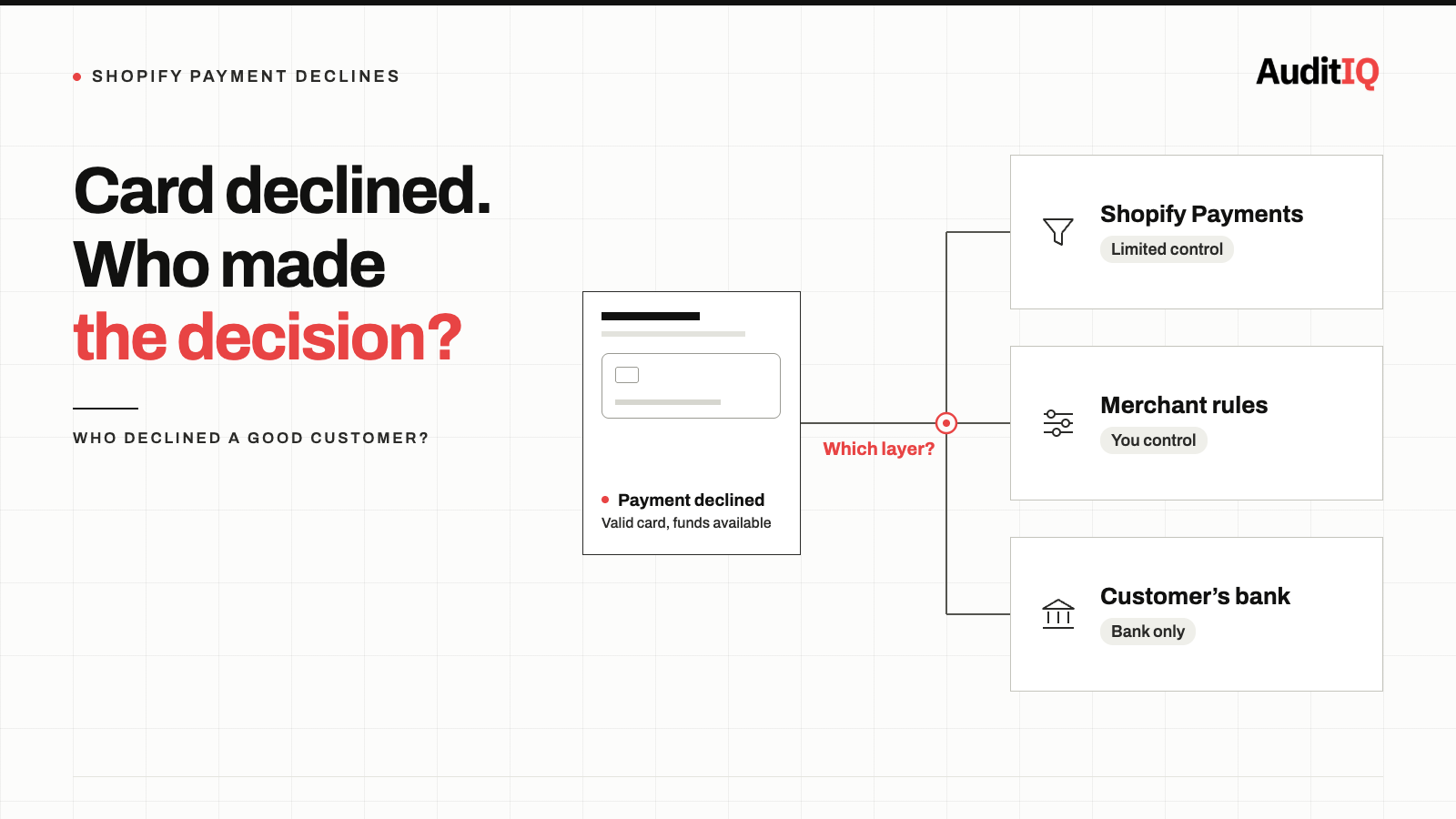
Who is declining the payment: Shopify Payments, your own rules, or the customer’s bank?
A decline can come from three places, and what you can change depends on which one it is. A low authorisation rate also includes legitimate declines, such as a wrong CVV or insufficient funds, so treat it as the place to start looking rather than as a false decline rate.
1. The processor’s own risk checks
Shopify Payments, which runs on Stripe, can refuse a payment before it ever reaches the customer’s bank. Merchants report messages such as “Stripe blocked this payment as too risky.” You have limited control over these checks, because the main settings are the AVS and CVV options described below, but you can see how often it happens and raise a recurring pattern with Shopify Support if it hits genuine customers.
2. Your own rules
Rules you control can reject good customers too: strict AVS or CVV verification, velocity rules in a third-party fraud app (Signifyd, ClearSale, Riskified), and automatic cancellation of orders that Shopify’s fraud analysis flags as medium risk. Multiple purchase attempts, high-value orders, and first-time customers are common triggers.
3. The customer’s bank
The issuing bank makes its own risk decision based on merchant category, amount, geography, and spending pattern, and you never see its reasoning. Shopify receives only a code, which is why do_not_honor is the hardest to act on. Cross-border sales are especially exposed: a common community report is a store based in one country selling to customers in another, with declines concentrated on one card network.
4. Saved cards that have gone stale
Saved payment methods with expired or replaced card numbers fail on repeat purchases and subscription renewals, often without the customer realising the card has changed.
How to measure your Shopify decline rate
Step 1: Check your payment authorisation rate
Shopify’s ShopifyQL payment_attempts schema exposes the payment authorisation rate (payment_authorization_rate, successful payments divided by unique payment attempts) and failed_payment_attempts, and lets you group the rate by payment method. Query it with ShopifyQL in Analytics and compare week by week. A common rule of thumb treats 95% or higher as healthy and below 90% as a sign of a systemic problem, but the most useful test is a drop against your own history.
Step 2: Review decline reasons
Find the failed payment attempts, for example in the payment timeline of an affected order or the transactions export for Shopify Payments, and note the reason on each. Group them to see patterns. Code names vary by gateway, and Shopify’s Admin API lists its own transaction error codes, but Shopify Payments commonly shows
Stripe-style codes such as:
do_not_honorandgeneric_decline, the bank refused without explanation. Only the bank can say why, so the customer needs to contact it.insufficient_funds, legitimate but unrecoverable at that momentincorrect_zipandincorrect_address, address verification failures, which appear if AVS rules are switched onfraudulentandpickup_card, a fraud or card flag from the bank, sometimes a false positive
Step 3: Segment by geography and payment method
Cross-border transactions, certain card networks, and specific issuers often have dramatically different decline rates. A spike in declines from one country, or on one card brand, can point to routing or entity issues rather than fraud.
Step 4: Compare with GA4 checkout events
If GA4 shows customers reaching the payment step but your completed order count drops by more than your normal abandonment rate, the gap may be declines.
Step 5: Estimate how many declines were false
Sample your declines and check which were genuinely legitimate, for example repeat customers, or shoppers who succeeded with another card or method minutes later. The share of legitimate declines among all declines is your working false decline rate.
What you can change, and what only the bank can fix
- Review your AVS and CVV settings. With Shopify Payments, address verification is off by default, and the option is to decline charges that fail postal-code verification (with a matching option for CVV), found under Settings → Payments → Shopify Payments → Manage → Reduce credit and debit card fraud. Shopify’s own analysis calls AVS a poor fraud predictor and reports that moving beyond rigid AVS controls reduces false declines, particularly for international and mobile shoppers. If either option is on, test switching it off and watch your chargebacks. If you use another gateway, AVS rules are set there, and many let you accept partial matches such as a postal code match with a street mismatch.
- Review borderline orders instead of auto-cancelling them. Shopify’s fraud analysis flags orders by risk level, and the decision to cancel is yours or your rules’. Review medium-risk orders before cancelling, and avoid blanket auto-cancel rules built with Shopify Flow or a fraud app. If a third-party fraud app auto-declines, check the threshold and move borderline orders to manual review.
- Give declined customers another route. When the bank refuses with do_not_honor, the practical fixes are a different card or payment method, or a call to the bank with the amount, time, and store name. Offer more than one payment method and write the decline message so it says exactly that, instead of leaving the customer to guess.
- Check whether cross-border declines have a structural cause. If your business entity and your customers sit in different countries, issuers may treat the transactions with more suspicion. Ask Shopify Support whether this is driving your declines. Some merchants have resolved it by processing through a local entity, which is a significant business decision rather than a setting.
- Keep saved cards current. Ask your payment provider whether card account updater or network tokenisation is available for your account, so replaced or expired cards refresh automatically instead of failing on repeat purchases.
- Retry soft declines only. For subscriptions and recurring billing, retry soft declines (temporary issuer problems, insufficient funds) a few times over the first week or two, spaced out. Stop retrying hard declines such as lost or stolen cards and fraud flags, because repeated attempts cost fees and can hurt your decline ratio. Subscription apps typically offer configurable retry schedules.
How to verify the changes worked
- Compare your payment authorisation rate before and after each change, by payment method, and look for a measurable increase
- Check that the mix of decline reasons has shifted, with fewer address-verification and fraud-flag declines
- Watch your fraud and chargeback rates for longer than two weeks. Chargebacks usually arrive weeks or months after the sale, so a quiet first fortnight is encouraging but not proof that the extra approvals were genuine
- Compare completed orders with checkout-initiated sessions in GA4. The gap should narrow
- Change one setting at a time, so you know which change moved the numbers
Keeping an eye on false declines with continuous monitoring
False decline patterns shift constantly as issuer risk models update, fraud rules change, and your customer mix evolves. A one-time audit catches today’s problems but misses tomorrow’s. Set up ongoing checks to:
- Track your payment authorisation rate weekly, by payment method, and alert on a drop below your baseline
- Watch the mix of decline reasons for sudden spikes in one code
- Compare geographic and payment-method segments monthly for diverging trends
- Line up changes in decline rate with platform updates, gateway changes, and fraud rule adjustments
Shopify’s own data tells you how many payments failed and why. AuditIQ watches the storefront symptoms around it, the ones that never show up as an admin error:
- User Experience Monitoring: tracks drop-off at each step of the checkout flow, with device, browser, and session context, so abandonment at the payment step shows up even when there is no error to report.
- Analytics: unsampled Google Analytics data with conversion funnel analysis in the same platform as your technical monitoring, so you can watch the gap between checkout initiation and order completion and line up a drop with something that changed on the store.
AuditIQ does not read Shopify’s decline codes or your authorisation rate, so keep the ShopifyQL checks above in your routine and use monitoring to tell you when it is time to look at them.
Beyond checkout, AuditIQ is a 360° eCommerce monitoring platform purpose-built for Magento, Adobe Commerce, and Shopify stores. It continuously monitors every critical layer of a store — performance, infrastructure, SEO, security, user experience, configuration, and code quality — from a single, unified dashboard, so the silent failures that cost you customers are caught before they compound.
Start monitoring your checkout journey for free today to see where good customers are dropping out between the payment step and the order.
Others also read
- 3D Secure payment failures in eCommerce: How to detect, diagnose and fix lost orders
- Why did my eCommerce revenue drop when traffic stayed the same?
- Shopify checkout errors on mobile: Form validation is silently blocking your highest-value customers
Frequently asked questions
1. How much revenue am I losing to false declines?
Industry estimates vary widely by source and scope, and there is no reliable benchmark for a single store, so measure your own: sample your declines and check what share was legitimate. For scale, Shopify reports that moving beyond rigid AVS controls and using 3D Secure intelligently raised payment success by 0.26% in its data, so the gains from a single change are real but modest.
2. Why don’t declined customers just try again?
Many do not. In consumer surveys, roughly 30% of shoppers say they would not shop with a merchant again after a decline. A decline damages trust, because customers assume the store is broken or does not want their business, not that a fraud filter made a mistake.
3. What can I do when a payment is declined with do_not_honor?
Only the issuing bank can explain it, because Shopify receives the code without further context. Ask the customer to try another card or payment method, or to contact their bank with the amount, date and time, and your store name. Offering more than one payment method gives them a way to complete the order.
4. Can I see which specific customers were falsely declined in Shopify?
Shopify shows failed payment attempts and decline reasons for Shopify Payments, but it does not label an attempt as a false decline. You have to judge that yourself, for example by looking for repeat customers or shoppers who completed the purchase with another method soon afterwards, or by using a fraud analysis tool.
5. Will reducing fraud filter sensitivity increase my fraud rate?
Not necessarily. Moving from auto-decline to manual review for borderline orders lets you approve legitimate customers without removing fraud protection. Change one setting at a time, and keep watching chargebacks, which arrive weeks or months after the sale.
About the author
Ginny Ngo writes from AuditIQ's experience monitoring eCommerce performance, SEO, security, and reliability issues across Magento, Shopify, WooCommerce, and Adobe Commerce stores.