Google's Demand Gen checkout links are expanding: What your landing pages need to keep up
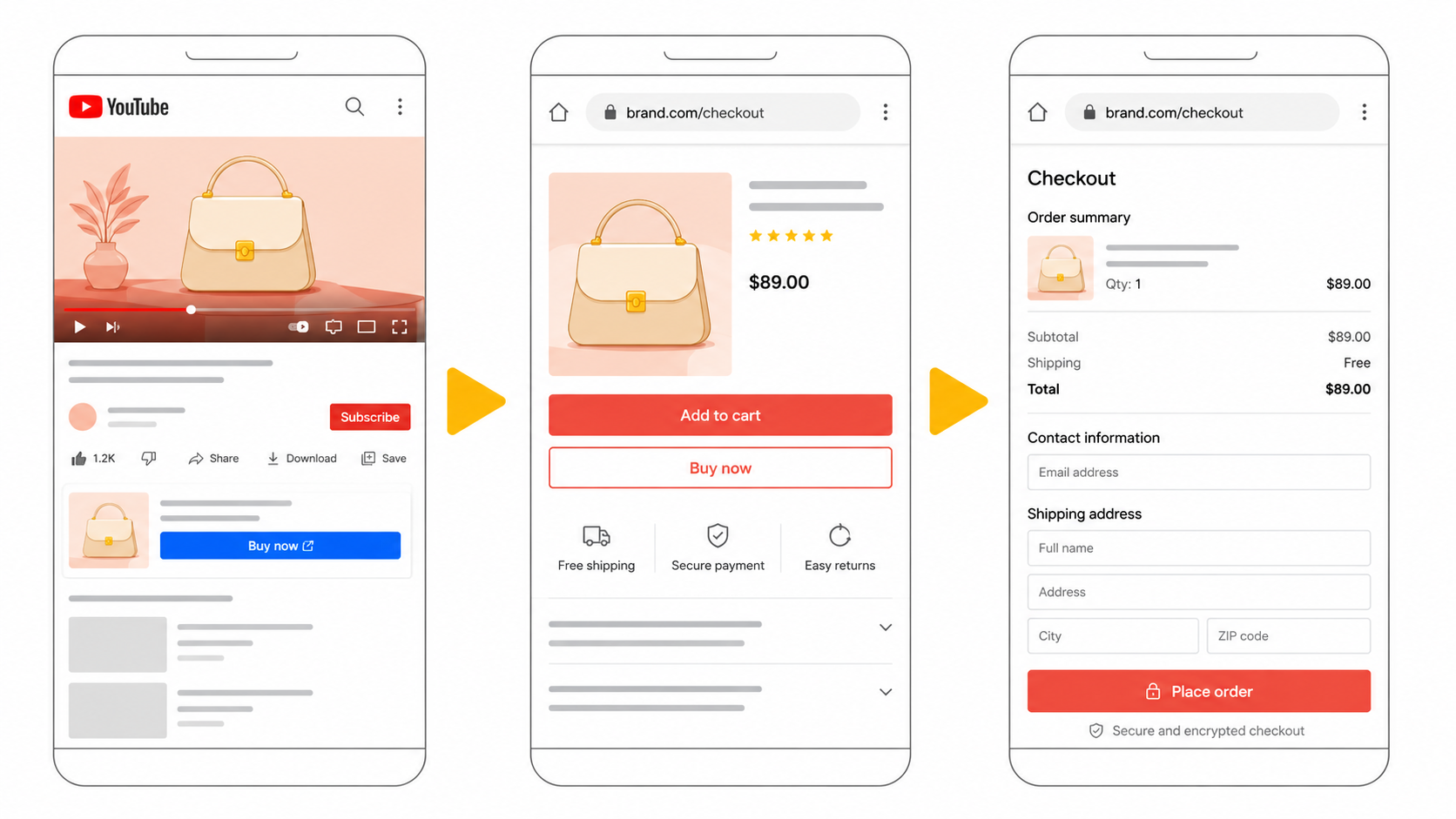
On July 29, Google announced its latest Demand Gen Drop, headlining the expansion of Checkout Links to nine new markets and reporting that advertisers using checkout URLs see a 6% conversion uplift on Demand Gen campaigns. For eCommerce merchants preparing for the holiday season, this sounds like a straightforward win: send YouTube viewers directly to your checkout page, skip the friction, close the sale.
But there's a catch that Google's announcement doesn't address. Checkout Links only work when the destination page actually works. And for most eCommerce teams, the pages at the end of those deep links are the least monitored part of their entire storefront.
What Checkout Links actually do
Unlike standard Shopping ads that link to a product detail page, Checkout Links send shoppers directly to a pre-populated cart or checkout page on your website. Google's data shows this shortcut delivers measurable results: an 11% increase in conversion value at similar CPA for US advertisers. Combined with YouTube, where 80% of viewers say the platform helps them make more confident shopping decisions, this creates a powerful path from discovery to purchase.
The expansion to Switzerland, Australia, South Korea, Indonesia, Mexico, France, Poland, Israel, and Argentina means a significant share of global eCommerce merchants can now use this feature for the first time. Combined with Google's Universal Commerce Protocol (UCP) and upgraded tROAS bidding, the July Drop positions Demand Gen as a serious revenue channel for product-led brands.
The problem no one is talking about
Here's what makes Checkout Links different from regular ad placements: when a standard Shopping ad sends a user to a product page, there are multiple opportunities to recover from errors. The shopper can browse related products, adjust quantities, or find an alternative. When a Checkout Link sends them directly to a cart or checkout page, there is no safety net. If that page doesn't work perfectly, the session is over.
The failure modes that kill Checkout Link conversions are specific and often invisible to the merchant:
1. Price mismatches. Your product feed says £29.99, but the checkout page dynamically calculates £34.99 after a recent price update that hasn't synced. The shopper sees a different price than what was advertised and abandons. Google may eventually disapprove the product, but in the meantime, every click costs money.
2. Out-of-stock products. The product was available when the feed was last crawled, but inventory depleted between the feed update and the click. The shopper lands on a checkout page with an empty cart or an error message.
3. Script conflicts on checkout pages. Payment gateway JavaScript, consent management platforms, loyalty programme widgets, and analytics tags all converge on the checkout page. A single script conflict can prevent the "Place Order" button from functioning, and this kind of intermittent failure often goes undetected because it only occurs in specific browser-and-device combinations.
4. Currency and locale errors. With Checkout Links now available in nine additional markets, merchants running multi-currency storefronts face a new surface area for failure. A checkout page that works perfectly for US visitors may display the wrong currency, tax calculation, or shipping option for a shopper arriving from a Demand Gen ad in Indonesia or Poland.
Why traditional monitoring misses these failures
The monitoring gap is structural. Most eCommerce teams rely on one of three approaches to quality assurance:
-
Manual spot checks: someone on the team clicks through a few products before a campaign launches. This catches obvious errors but misses intermittent failures, edge-case browser behaviour, and time-sensitive issues like flash stock-outs.
-
Google Merchant Center diagnostics: these report on feed-level data quality but don't check what actually renders on your checkout page when a real shopper arrives. There's a meaningful lag between a page-level error occurring and Merchant Center detecting it.
-
Synthetic monitoring: uptime and performance tools that ping your URLs on a schedule. These confirm the page loads but don't verify the business logic: is the price correct? Is the add-to-cart button functional? Does the payment form render?
None of these approaches monitors the specific failure modes that undermine Checkout Links. And because these failures are often intermittent, occurring only for certain product-market-browser combinations, they can silently erode campaign performance for days before anyone notices the dip in ROAS.
What eCommerce teams should monitor
If you're activating Checkout Links for Demand Gen campaigns, or planning to before the holiday season, there are concrete steps to take now:
- Validate checkout page rendering across markets. For every market where Checkout Links are active, confirm that your checkout pages render correctly with the right currency, language, tax calculations, and shipping options. This isn't a one-time check; it's a continuous requirement.
- Monitor price and availability alignment between feed and storefront. The price in your Merchant Center feed must match the price on the landing page at the moment of click. For stores with dynamic pricing, promotional rules, or frequent inventory changes, this alignment can break multiple times per day.
- Watch for JavaScript errors on checkout pages. The checkout page is the single most script-heavy page on most eCommerce sites. Track client-side errors in real user sessions, not just synthetic tests. An error that blocks the payment form for 3% of visitors on Safari won't show up in your Chrome-based testing.
- Track the conversion gap. Compare your Demand Gen click volume against actual completed purchases. If clicks are arriving but conversions aren't tracking, you may have a broken checkout experience, a tracking failure, or both.
How AuditIQ helps
AuditIQ eCommerce monitoring continuously tracks the pages and processes that matter most to your ad spend, including checkout pages, product detail pages, and the data layer that feeds your analytics and conversion tracking. Rather than relying on periodic manual checks or waiting for Merchant Center to flag a problem days later, AuditIQ detects price mismatches, JavaScript errors, broken payment forms, and tracking failures as they happen in real user sessions.
When Google gives you a new lever to drive conversions, AuditIQ makes sure the machinery behind that lever actually works.
Book a free AuditIQ demo to see how continuous storefront monitoring protects your Demand Gen investment before the holiday season.
About the author
Dan Garner writes from AuditIQ's experience monitoring eCommerce performance, SEO, security, and reliability issues across Magento, Shopify, WooCommerce, and Adobe Commerce stores.