Google AI mode shows different products and prices than your shopping listings: What you can check and fix
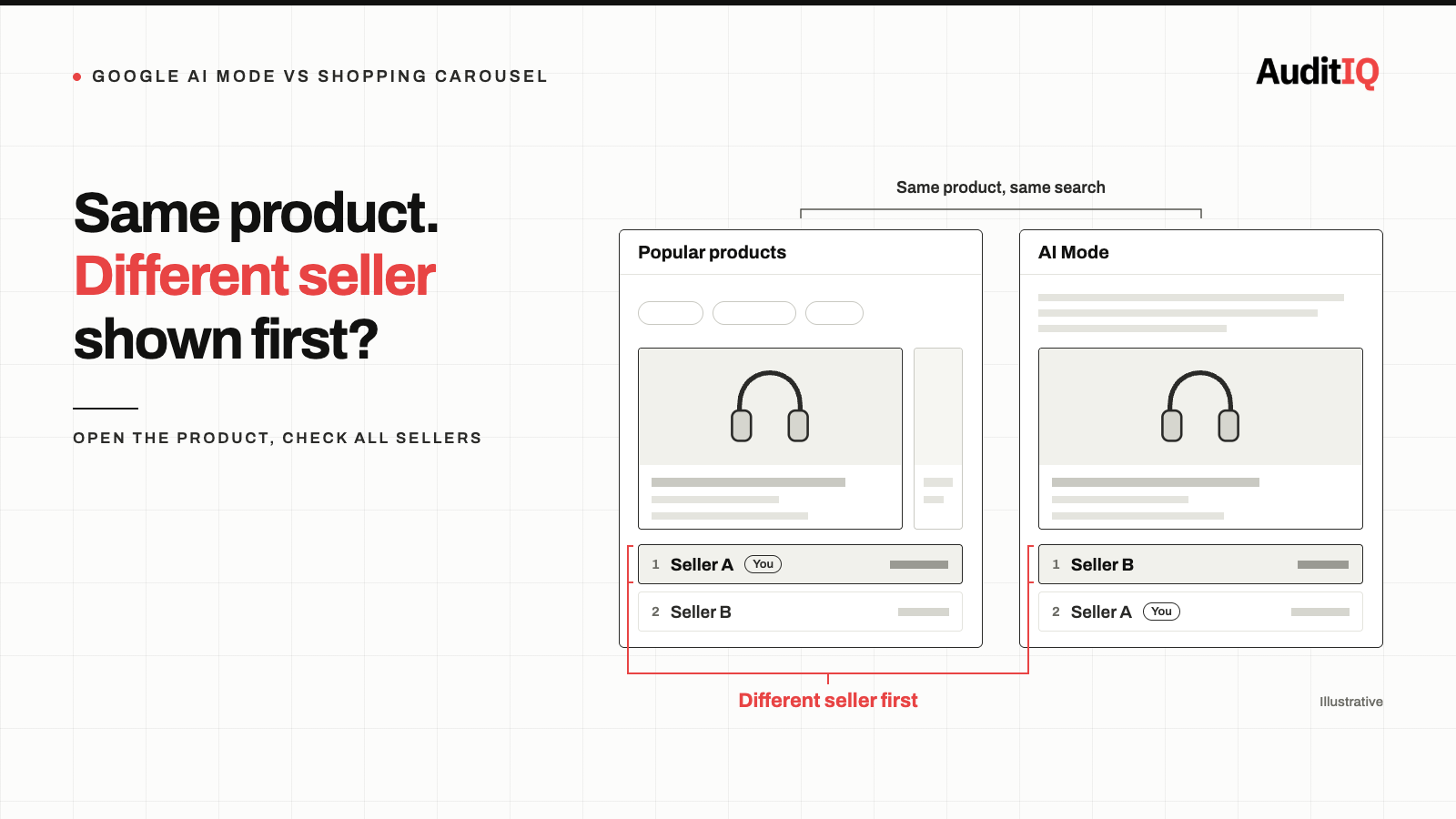
Google AI Mode often shows different products, sellers, and prices than the regular Shopping carousel. In Productrise’s August 2026 study, only 1.28% of carousel products also appeared in AI Mode on the same day, and the first-listed seller differed for 49.6% of matches. Google says both draw on the Shopping Graph. Check Merchant Center’s AI performance insights, compare the lead seller and price yourself, and fill in the product attributes Google says are missing.
Most eCommerce teams treat Google Shopping visibility as a single channel: you submit your feed to Merchant Center, your products appear in Shopping ads and free listings, and you optimise from there. The implicit assumption is that strong carousel performance carries over into AI Mode. Productrise’s analysis suggests it often does not, and that the seller and price a shopper sees first in AI Mode may not be yours.
What the Productrise study found about AI mode and the shopping carousel
Productrise, which sells organic product tracking for Google Shopping, monitored more than 2 million product listings across more than 100,000 results in the US and UK from August 9 to 31, 2026, running the same product searches in AI Mode and regular search on the same day. It reported:
- Only 1.28% overlap: on average, 1.28% of products in the Popular products carousel also appeared in AI Mode for the same query on the same day. This is a daily rate.
- 3.9 products against 27.8: when both surfaces returned products, AI Mode showed an average of 3.9 per query and the carousel 27.8.
- A different lead seller 49.6% of the time: among products that appeared in both, the first-listed seller was a different merchant in nearly half of cases.
- A different price 38.1% of the time: among matched products, the first-listed price differed on 38.1%. When it did, AI Mode showed the higher price 68.4% of the time, by a median of 22.2%, and when AI Mode was cheaper the median gap was 7.8%.
How to read these numbers
The study is a useful prompt to check your own products, with limits. It comes from a vendor, covers only the Popular products carousel, mostly follows the products the company tracks rather than a random sample of searches, and records what was displayed, not clicks or purchases. It also does not explain why the two surfaces choose differently. Google told Futurism it had not verified the claims and that all shopping results, including AI Mode, are powered by the same Shopping Graph, as reported by Search Engine Journal. Two things still follow. A carousel position tells you very little about AI Mode, and the first offer shown for your product may belong to a competitor.
Why does AI mode show different products than the shopping tab?
Neither Productrise nor Google has published how AI Mode selects products, so treat the points below as reasoning, not established findings.
Both surfaces draw on the Shopping Graph, but they select differently
The Shopping Graph is Google’s product knowledge graph, fed largely by Merchant Center product data and product pages. Google says AI Mode and the results page use the same data source, so the difference lies in how products and sellers are chosen from it. Google also notes that on AI surfaces people ask longer, more complex questions, such as “waterproof running shoes for wide feet under $150”, which need deeper attribute matching than a plain “running shoes” search.
Why a short list punishes thin product data
When a carousel shows 28 products, a moderately optimised listing can still appear. When AI Mode shows around four, there are far fewer chances, so gaps in attributes, descriptions, or pricing accuracy are more likely to cost you a place. Productrise’s founder also interprets the pattern as the cheapest price carrying less weight in AI Mode, but the data does not test that.
Signs your products are missing from AI mode
You may have an AI Mode visibility problem if:
- Your products appear in Shopping ads and free listings but never in AI Mode answers when you test conversational product queries
- A competitor is listed as the lead seller for products you also sell, including queries where you rank well in the carousel
- The price shown for your product differs from yours. First check whether the offer shown is another seller’s before assuming your own data is wrong.
- Your share of voice in Merchant Center’s AI performance insights is low for the product categories and queries that matter to you, where the report is available
- Revenue from Google organic sources declines while Shopping ad performance stays stable. One possible explanation is AI Mode answering product queries without sending the click, though other causes are just as likely.
How to check where your products stand in AI mode
Step 1: Open Merchant Center’s AI performance insights report
Google’s AI performance insights report, found under Analytics → Products → AI performance in Merchant Center, shows your share of voice in conversational shopping queries on AI Mode and AI Overviews, how many of your products are showing, and the top terms, popular attributes, and search intents for your product categories. It currently covers English-language queries for accounts in Australia, Canada, India, New Zealand, and the United States, includes organic traffic only, and does not show which seller or price AI Mode lists for a product.
Step 2: Search your key products in AI mode and in the carousel
AI Mode is one click away from any product search. Search for your main products with conversational, attribute-rich queries, then run the same search in regular results:
- “Best [your product category] for [specific use case] under [price point]”
- “Which [product type] works with [compatible product]”
- “[Your product category] with [specific feature] reviews”
Note whether your products appear on each surface, which competitors show, and who is listed first.
Step 3: Compare the lead seller and the price
The first-listed offer is one of several: opening a product shows the other sellers and their prices. If a different seller is first, the price you see is theirs, and that is a competitive question, not a data error. Treat it as a data problem only if your own offer shows a price that differs from your feed or landing page. In that case, Google’s guidance on inaccurate price status lists the usual causes: the price in your feed and the price on your landing page being out of sync because of update timing, a mismatch with your structured data, multiple prices on the page, a variant other than the advertised one being pre-selected, or a price that isn’t loaded on the page immediately.
Step 4: Audit your feed attributes
- Product type and category: use Google’s full taxonomy, not abbreviated categories
- Detailed attributes: material, size, colour, pattern, age group, gender, and any product-specific attributes Google supports
- Titles and descriptions: include the terms shoppers use, starting with the top terms and missing attributes from the AI performance insights report
- Price and availability: keep them current, since products that move between in stock and out of stock are harder to present reliably
Step 5: Check your product pages and structured data
- Product schema with Offer, reviews, and full attribute markup
- Natural-language content that answers comparison and use-case questions
- The same price on the page, in the structured data, and in your Merchant Center feed
How to improve your chances of appearing in AI mode
Fill in the attributes Google says are missing
For every product, populate the attributes Google supports, not only the required fields. Google’s own advice is to add the relevant search terms to your titles and descriptions, populate any missing attributes, and start with the most popular terms and missing attributes shown in the report.
Write titles and descriptions for conversational queries
AI surfaces handle queries that sound like questions, not keyword strings. Your titles and descriptions should naturally answer “which”, “what”, “best for”, and comparison queries. This is not keyword stuffing; it is attribute-rich, natural-language product description.
Keep price and availability in sync
If your products have dynamic pricing, promotions, or inventory changes, increase your feed update frequency so the price and availability Google holds match your storefront. Review the sale price and sale price effective date attributes if you run promotions.
How to confirm your changes are working
- Re-test your target queries in AI Mode and note whether your products and your offer now appear
- Watch your share of voice and products showing in AI performance insights, where available. Historical data updates daily with a lag of a few days
- Check that the price and seller shown for your product match your feed and landing page
- Repeat the comparison between carousel and AI Mode for your top queries every week, since results can change as the Shopping Graph is updated
Keeping an eye on AI mode visibility between checks
Whether Google selects your product depends partly on the data it can read from your store, and that data drifts after theme changes, app installs, and catalogue updates. AuditIQ helps with the storefront side:
- GEO Audit — validates Product, Organization, BreadcrumbList, and FAQ schema markup, checks how clearly your brand and products are defined, and gives an AI citation readiness score, with competitor benchmarking, so the structured data AI engines read stays complete.
- SEO Audit — a weekly crawl of up to 20,000 pages with 100+ checks per page, including structured data, so product pages whose markup breaks after an update are flagged along with the exact pages affected.
- Analytics — unsampled Google Analytics data with channel performance in the same platform as your technical monitoring, so a decline in Google organic traffic or conversions shows up next to what changed on the store.
AuditIQ does not read your Merchant Center feed or show what AI Mode displays. For that, use Merchant Center’s AI performance insights where it is available, together with the manual comparison above.
Beyond product data, AuditIQ is a 360° eCommerce monitoring platform purpose-built for Magento, Adobe Commerce, and Shopify stores. It continuously monitors every critical layer of a store — performance, infrastructure, SEO, security, user experience, configuration, and code quality — from a single, unified dashboard, so quiet changes that weaken your product data are caught before they cost you visibility.
Start monitoring your product data for free today to catch the next silent data change before it reaches Google.
Others also read
- Your products exist but AI can't find them: How Generative Engine Optimisation is reshaping eCommerce discovery
- Google Merchant Center's September 2026 overhaul: Three changes that could silently break your shopping campaigns
- Your products may not be showing up when AI agents search for them: How to verify Shopify catalog visibility
Frequently asked questions
1. Why does AI Mode show a different seller and price for my product?
The first-listed offer is one of several for the same product, and the seller shown first can differ between AI Mode and the carousel, with the price changing alongside it. Open the product to see all sellers, and check that your own offer matches your feed and landing page.
2. Where can I see how my brand performs in AI Mode?
In Merchant Center, the AI performance insights report shows your share of voice for conversational shopping queries on AI Mode and AI Overviews. It is available for English-language queries in accounts in Australia, Canada, India, New Zealand, and the United States, covers organic traffic only, and does not show seller or price details.
3. Does AI Mode use my Shopping ads data or my free listings data?
Google says shopping results across Search, including AI Mode, are powered by the Shopping Graph, but it has not published how products are selected. The AI performance insights report currently covers organic traffic, such as free listings, and excludes paid ads.
4. Can I opt out of AI Mode product recommendations?
We could not find an AI Mode-specific opt-out. The controls you have sit at the Merchant Center level, such as which products and programmes you submit. Check Google’s current documentation, since this area is changing quickly.
5. Does the Productrise study apply to my store?
Treat it as a prompt, not a verdict. It comes from a vendor, covers the Popular products carousel in the US and UK, and mostly follows products the company tracks. Run the same comparison for your own top products and see what you find.
6. How often should I check my AI Mode visibility?
Weekly is a reasonable routine for your highest-value product queries, with the AI performance insights report as a trend view between manual checks.
About the author
Ginny Ngo writes from AuditIQ's experience monitoring eCommerce performance, SEO, security, and reliability issues across Magento, Shopify, WooCommerce, and Adobe Commerce stores.